Your vehicle is equipped with a Lithium-ion high voltage
battery that is used to power the electric powertrain systems and
the 12 Volt vehicle electrical system.
The high voltage battery is located under the rear seat.
Lithium-ion batteries provide the following benefits:
Lithium-ion
batteries are much lighter than other types of rechargeable batteries
of the same size.
Lithium-ion batteries hold their charge; they only lose approximately
three percent of their charge per month.
Lithium-ion batteries have no memory, which means that you
do not have to completely discharge them before recharging, as with
some other batteries.
Lithium-ion batteries can be recharged and discharged thousands
of times.
High Voltage Battery Service Disconnect
The high voltage battery service disconnect is located under
the access panel, under the left side rear seat. Only a qualified
service technician should access the high voltage battery service
disconnect.
If your vehicle requires high voltage battery service, see an
authorized dealer.
Warning:
Never try to remove the high voltage battery service disconnect.
The high voltage battery service disconnect is used when your vehicle
requires service by a qualified technician at an authorized dealership.
Failure to follow this warning can result in electrical shock, toxic emissions,
fire, and other hazards which can cause death or serious injury
including severe burns, respiratory injuries, and blindness.
The high voltage battery and battery case have no parts that
you or an unqualified technician can service. Under no circumstances
should you or an unqualified technician open, disassemble, penetrate,
or tamper with the high voltage battery, battery case, their cables,
or connectors. Damage to these components can result in electrical
shock, toxic emissions, fire, and other hazards which can cause
death or serious injury including severe burns, respiratory injuries, and
blindness. You should take the vehicle to an authorized dealership
for any service or maintenance on these high voltage components.
Disposal of the High Voltage Battery
Your vehicle’s high voltage battery is designed to last the life
of your vehicle. See an authorized dealer for information on the
disposal of the battery if it should require replacement.
Warning:
Your
vehicle contains a sealed Lithium-ion high voltage battery. If the battery
is disposed of improperly, there is a risk of electrical shock and
toxic emissions which can cause severe burns, respiratory injuries,
fires, and other hazards resulting in serious injury or death.
General Information
The vehicle is
also equipped with a Battery Management system that is designed to:
Ensure safe operation
Maximize driving range
Maximize the life expectancy of the high voltage battery
Note:
During
vehicle start up and shut down, a clicking noise may be heard from
within the vehicle. When the vehicle is preparing to start, the
high voltage battery contactors inside the battery are closed to
make the stored electricity inside available for vehicle use. After
the vehicle is shut down, the contactors open, to electrically isolate
the battery from other vehicle systems. The clicking noise is the
sound of these contactors as they open and close during normal operation.
Warning:
In
the event of a collision:
If your vehicle is still
drivable, pull off to the side of the road when safe to do so, place
the transmission in the PARK position, apply the parking brake,
and turn the vehicle off.
Beware of any exposed high-voltage parts or cables. To avoid
electrical shock which can result in serious injury or death, never
touch wiring, connectors, and other high-voltage parts, such as
the inverter unit and the Lithium-ion battery.
Leaks or damage to the Lithium-ion battery may result in
a fire and toxic emissions which can cause severe burns, respiratory
injuries, and other serious injuries or death. If you discover these
leaks, contact emergency services immediately. Since the fluid leak
may be Lithium Manganate from the Lithium-ion battery, never touch
the fluid leak inside or outside of the vehicle. If the fluid contacts
your skin or eyes, wash these areas immediately with a large amount
of water and obtain immediate medical attention to help avoid serious
injury.
If a fire occurs in your vehicle, leave
the vehicle as soon as possible and contact emergency services.
If you are not able to safely assess the vehicle due to vehicle
damage, do not touch the vehicle. Leave the vehicle and contact
emergency services. Advise first responders that this is a hybrid-electric
vehicle.
In the event of an accident that requires bodywork, refer
to an authorized dealership.
If your vehicle was not in a collision but the undercarriage received an impact from
road debris or other source while driving, have the Lithium-ion battery inspected by an
authorized dealer.
Battery Conditioning
In extreme temperatures,
high or low, the high voltage battery may need to be conditioned,
and therefore may require the vehicle to be plugged in.
If the ambient temperature
is 5°F (-15°C) or below at vehicle shut down, the instrument cluster
will display the message “Plug In Vehicle To Condition Battery”.
If the battery temperature
is below -22°F (-30°C), or 131°F (55°C) or above, the vehicle will
NOT start:
If the vehicle
is plugged in at these battery temperatures, the instrument cluster
will display the message “Please Leave Key In RUN — Battery Conditioning
Needed”.
If the vehicle
is not plugged in at these battery temperatures, the “Plug In Vehicle
To Condition Battery” will be shown in the instrument cluster display.
Note:
When the “Please
Leave Key In RUN — Battery Conditioning Needed” message is displayed,
keep the ignition in the RUN position for the battery to recover.
Place the ignition back in the OFF position when the message disappears,
and then start the vehicle. When this message is displayed, do not
operate any air conditioning controls.
Under these
high or low temperatures, while the vehicle is plugged in and the
ignition is in the OFF position, the vehicle may “wake up” to precondition
the high voltage battery for use.
It is recommended
that the vehicle be plugged in overnight when possible to maximize
the electric range of the vehicle.
It is recommended
that the high voltage battery not be exposed to direct sunlight in
high temperature environments while the vehicle is OFF. This may lower
the life of the battery.
The
messages will only be displayed when the ignition is in the RUN position
and the high voltage battery is not ready to provide propulsion power.
The messages will also display if there was a failed attempt to achieve
READY state when the high voltage battery cell temperatures were either
too cold, or too hot.
Power Box — If Equipped
Warning:
This publication contains important
instructions and warnings that should be followed during the use of the Power Box feature.
Before using the Power Box, make sure to check the equipment for moisture or water damage.
Failure to follow these warnings and instructions can result in electrical shock and fire
which can cause death or serious injury.
Refer to the warning labels on the side of the Power Box and on the charging cables.
The engine may idle during use to power the outlets. A running
engine emits exhaust containing carbon monoxide, which can cause injury
or death if inhaled. Never use in closed or confined spaces.
Never use the Power Box, vehicle
charging port, or 3-pin outlet power plug while in use with wet hands. Always handle the
Power Box with dry hands. Never use or allow the Power Box to get wet. Do not use it in
wet or damp locations, and do not submerge it in water. Only use electrical equipment
with a waterproof function/rating, or use it in a waterproof environment. Do not use in
environments with rain or high humidity.
Never insert metal objects into the
Power Box connectors, or in the vehicle charging port, as this action can damage the
connection terminals or cause electric shock resulting in injury or death.
Never disassemble the Power Box.
Do not overload electrical extension
cords plugged into the Power Box outlet.
If there is a risk of lightning, do not
use the Power Box system outside the vehicle.
When the Power Box is in operation, the
vehicle’s cooling fan can operate automatically even if the vehicle is turned off. Do
not put your hands near the cooling fan while it is operating.
Never use electrical equipment that requires a continuous power
supply, such as medical equipment. The power supply may be interrupted
depending on the vehicle’s condition.
Do not use the Power Box to back feed your house or home electrical system under any
circumstance.
Scan this QR code to learn more about the Power Box.
The
Power Box enables the transfer of energy from the vehicle's High Voltage Battery to power 120V
AC items that may typically be used outdoors.
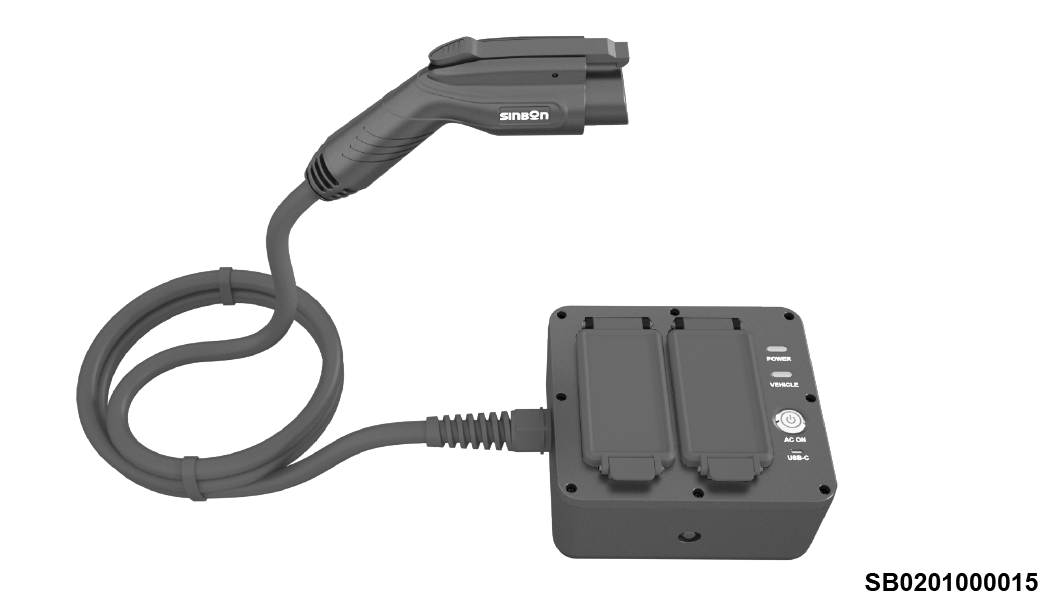
Power Box
Please read all Cautions and Safety procedures within these Power Box instructions before
operating.
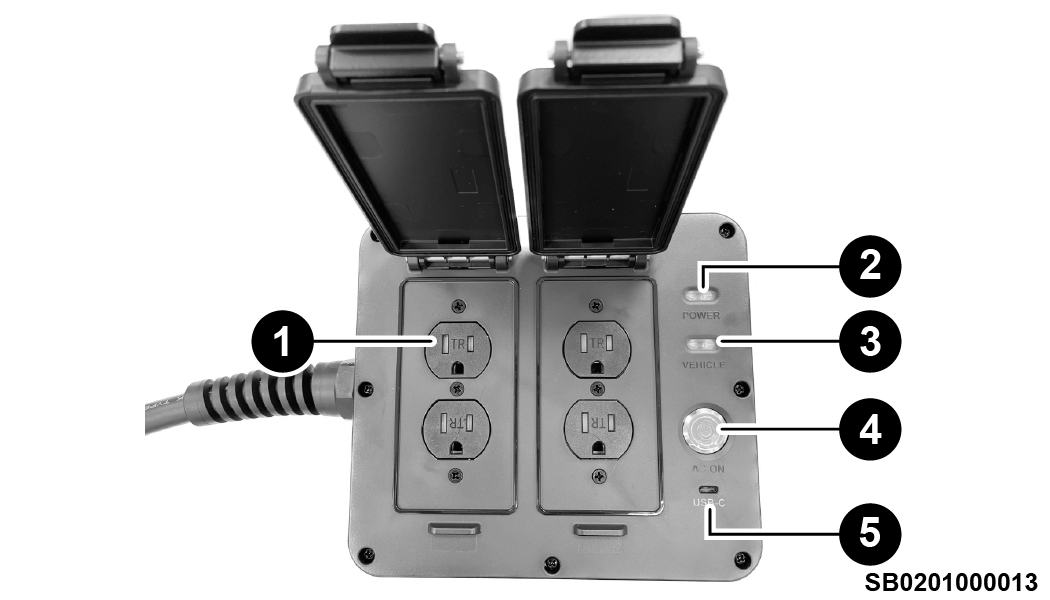
Power Box
1 — Power
Outlet
2 — Power Indicator
Light
3 — Vehicle Indicator Light
4 — AC On Button
5 — USB-C Port
Note:
The USB-C port is used to charge the Power Box internal battery and does not offer
external charging capabilities.
The Power Box cannot be used to charge other vehicles.
The energy to support the loads are provided
by the High Voltage Battery in the vehicle. The inverter in the vehicle will convert the
direct current (DC) power from the High Voltage Battery to alternating current (AC) power to
support the loads.
Getting Started
The Power Box provides maximum flexibility using the high voltage system under three
modes of operation:
Battery Mode
In Battery Mode, the High Voltage Battery will provide power to the Power Box
until depleted. A minimum battery charge is required to use this mode.
Conditions where Battery Mode may be desired: An overnight camping trip
where engine noise is not desired.
Battery Mode will become available
when the displayed charge level on the vehicle High Voltage State of Charge
indicator is greater than or equal to 1%.
The Engine will not run while in
Battery Mode.
The Power Box will deactivate when
the High Voltage Battery is less than 1%.
Generator Mode
In Generator Mode, the engine will run to power equipment and maintain the charge
of the High Voltage Battery. When the High Voltage Battery is finished charging
or the vehicle is low of fuel, the Power Box will switch to Battery Mode.
Conditions where Generator Mode may be desired: The customer wants to
maintain a high battery charge for future all-electric driving.
For Generator Mode to function,
the Low Fuel Indicator can not be on.
The engine will run until a low
fuel-level is reached or the battery charge is approximatly 95%. When either of
these states are achieved, the Power Box will switch to Battery Mode.
Blended Mode
In Blended Mode, the Engine runs and stops as needed to maintain battery charge.
This provides a balance in efficiency and will keep the Power Box powered for
the longest amount of time.
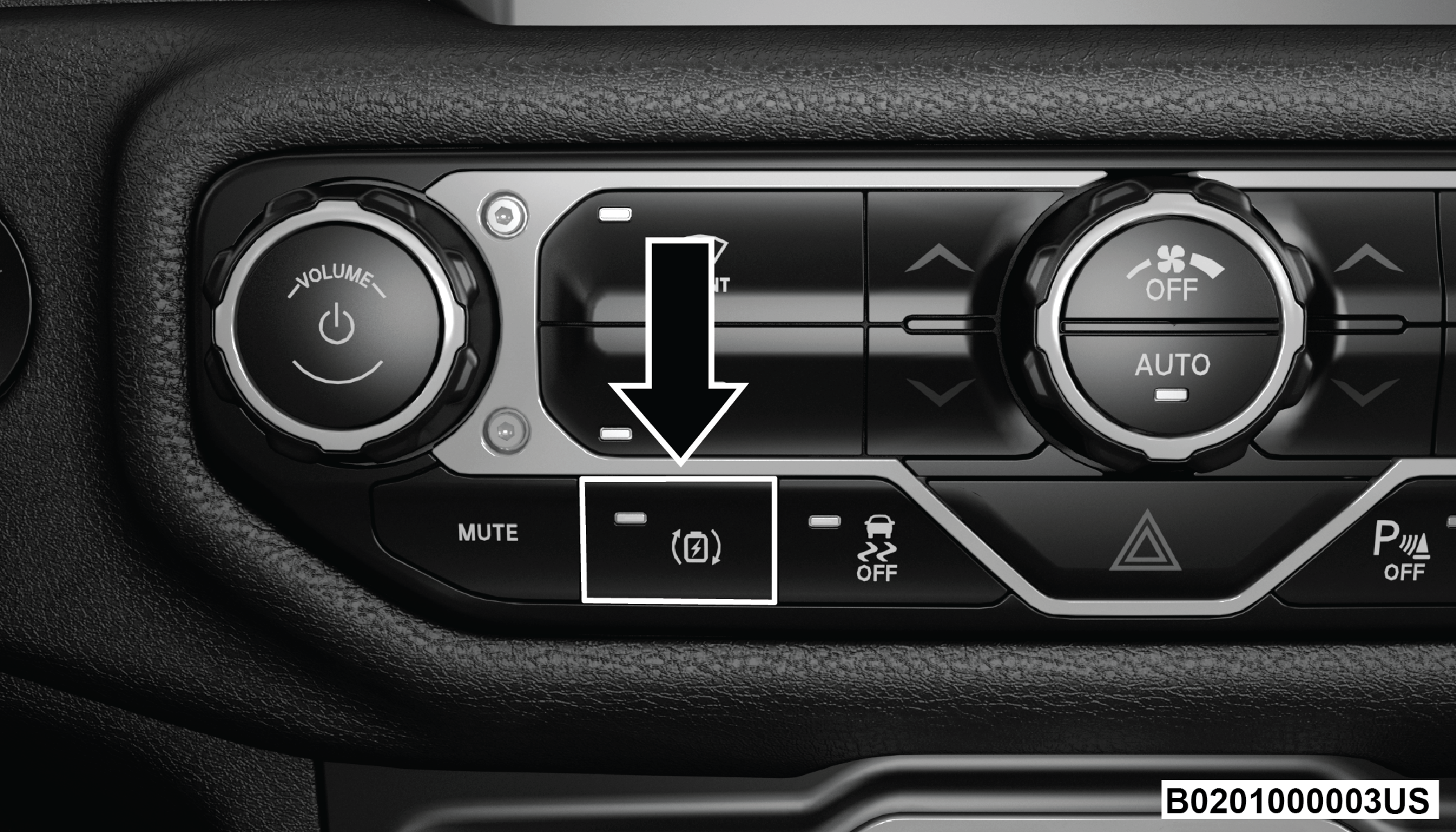
Press the Max Regeneration button when the Power Box is on, and it is in either
Battery Mode (post-start) or Generator Mode.
Max Regeneration Button
The Max Regen button indicator will illuminate when the Power Box is in Blended
Mode.
Conditions where Blended Mode may be desired: When extended AC power needs
are required, use this mode to maximize the duration of power.
The engine will start (if not already running) when the mode is activated. It
will run for a minimum of five seconds.
The engine will stop and start as needed to maintain the High Voltage Battery.
When the Low Fuel Indicator turns on, the Power Box will default to Battery mode
until the High Voltage Battery charge level is approximately 1%.
Note:
If the Power Box is in Blended Mode
and the Max Regeneration button is pressed, it will default to Generator Mode if the
engine is ON and running. The Power Box will default to Battery Mode if the battery
State of Charge (SOC) is above the minimum threshold plus the engine is off. If the
engine is off and the SOC is below the minimum threshold, the system will turn
off.
Powering On The Power Box
Follow these steps to power on the Power Box.
Set the Ignition in either ACC or RUN (engine running or not running).
Connect the Power Box electric plug to the vehicle.
Push the Power Box AC On button.
If desired, the vehicles ignition can be turned off while the Power Box is on. If the
vehicle is turned off, the following will occur:
The Power Box will switch to Battery Mode (unless already in Battery Mode) and
stay powered until the High Voltage Battery charge is depleted.
Increases the total time Battery Mode can provide 120V AC power as it will be
putting less power to the in-vehicle systems.
To disable AC power to the AC outlets, push the AC On button one time.
Caution:
Power off and disconnect the Power Box if
any electrical equipment/appliance has a strange odor, or begins to smoke while the
equipment or appliance is powered ON or operating.
General Operating Notes
If the Power Box is on and the AC On button is pressed to stop power, the vehicle will
completely shut down.
When the Power Box is plugged in and while the AC On button is not pushed on the panel,
the vehicle will display an “External Issue Detected” pop up and a fault indication until
Power Box is turned on.
Ensure electrical equipment and appliance power switches are in the Off position before
inserting the plug into the Power Box's power outlet.
The Power Box will be reset to OFF every
time the Power Box assembly is unplugged.
When the Power Box assembly is plugged in,
the vehicle can never be shifted out of Park.
Disconnecting the Power Box from the vehicle will always require the key to be recognized
before the vehicle can be driven again.
The dash mounted SOC indicator lights will display approximate High Voltage Battery
charge level while the Power Box is on.
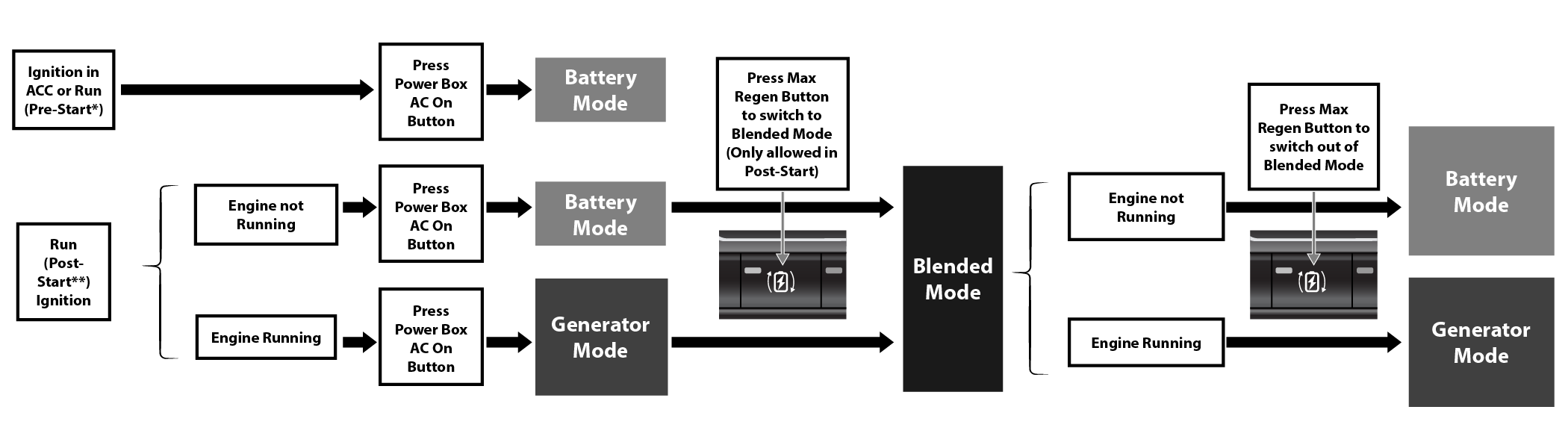
Power Flow Process
See the following table for a description of how to achieve any of the three operating modes.*,**
Power Box Mode Process Flow
Resetting The Power Box
If the ground fault circuit interrupter (GFCI) is triggered, it will shut off AC power, and the
power LED will flash for 20 seconds. The following instructions will explain how to
reset the Power Box during this fault.
Unplug the Power Box cord from the vehicle for ten (10) seconds and plug it back
in.
Set the ignition to either ACC or RUN.
Push the Power Box AC On button to resume Power Box operation.
Note:
If the GFCI reset procedure fails to resolve the fault, please contact your
authorized dealer for service.
Performing An Internal Power Box Battery
Check
The Power Box has an internal rechargeable
battery that will start the Off-Board communications with your electric vehicle. Should
the internal battery be low/discharged, you will need to use an external USB-C power
source to charge the Power Box.
Note:
Ensure you have a USB-C power source
or external adapter that can provide 5V/2A to the Type C connector.
Procedure can be followed if the Power Box is plugged in or unplugged from the vehicle.
Push the Power Box AC On button for one second to start up internal power. The AC
power indicator will turn on and then off. If there are no flashes, the Power
Box battery is depleted. It must be charged.
Push the Power Box AC On button again one (1) time. The AC On button will flash
once and continue to flash three (3) times to indicate that there is sufficient
power to start the Power Box.
Note:
If the AC power light does not flash three times, the internal battery is low. Use an
external USB-C power source to charge the battery.
Connecting a USB charger to the unit will allow it to communicate with the vehicle
immediately if connected to the vehicle. The Power Box will recharge its internal
battery from the vehicle's High Voltage Battery. It will take about 1 to 4 hours to
charge the internal battery. To perform the Power Box Internal Battery recharge:
Press the Power Box AC On button one (1) time. The power indicator will flash On
and then Off.
Prss the Power Box AC ON button one (1) time again. The power and vehicle
indicator will flash alternately, meaning the Power Box is charging.
When the battery had finished charging, the power and vehicle indicator on the
Power Box will turn off.
Charge the Power Box lithium-ion battery every three (3) months to maintain battery life.
The Power Box internal battery is not serviceable. Do not exceed one (1) year without
recharging the battery.
Caution:
It is important to follow these Power Box
instructions and cautions for overall use and operation. Failure to follow these
instructions may result in damage to the Power Box, vehicle, and/or appliance.
Never leave electrical
equipment/appliances connected and operating on the Power Box unattended.
It is recommended to plug electrical
equipment/appliances directly into the Power Box and not with an extension cord.
Never use high
power electrical equipment/appliances such as an air conditioner,
washing machine, or dryer.
This product contains lithium-ion battery and should be disposed
appropriately to avoid fire and environmental impact. Do not dispose
with regular household garbage.
LED Light Conditions
The below chart highlights the different LED light
conditions on the Power Box:
Condition
Normal
Communications
Fault
Battery Checking
Battery Charging
Description
Normal Operation
Waiting on Vehicle ON
GFCI Fault
Check Internal Battery Level
Charging Battery with USB C port
Power LED
Solid/ON
OFF
Blinking 20 seconds
OFF
Charging: LED OFF
Fully Charged: Power and vehicle indicator will flash alternately
when unit is fully charged.
Vehicle LED
Solid/ON
Blinking 120 seconds
OFF
OFF
AC ON LED
Solid/ON
OFF
OFF
Blinks 3 times: Sufficient Power
Blinks 1 time: Lower Power
No Blink: Battery Depleted
OFF
Notes
Note 1
Note 2
Note 3
Note 4
Note:
When on, All three LEDs indicate AC power is supplied to the AC Sockets.
The LEDs will flash when the Power Box is establishing communication with the
vehicle. The vehicle must enable the Power Box.
A blinking LED indicates a fault.
Regenerative Braking System (RBS)
Your vehicle has a RBS. The RBS replenishes the vehicle's
high voltage battery during deceleration, and is particularly useful
in stop-and-go city traffic. The electric motors, which propel the vehicle
forward, can operate as generators when braking. The RBS recharges
the high voltage battery under certain braking conditions by recapturing
energy that would otherwise be lost while braking. The electric
power that is generated goes back into the high voltage battery
for later use, for example when acceleration is desired.
The RBS uses conventional hydraulic friction brakes, regenerative
braking, or a combination to slow the vehicle. If the system detects
slippery conditions while braking, ONLY friction is used to slow
the vehicle. The RBS can result in extended life of the hydraulic
service brakes; however, all inspection, scheduled maintenance,
and service intervals for the vehicle service brakes must be followed.
Max Regeneration
Max Regeneration is a supplemental feature of the RBS. When activated,
it will use the RBS to help slow the vehicle when the driver releases
the accelerator pedal. This feature allows you to moderately reduce
driving speed without pressing the brake pedal. It is always necessary
to apply the brake pedal to bring the vehicle to a complete stop.
Max Regeneration Button
This feature can be activated by pressing the Max Regeneration
button, below the radio screen.
Note:
The Max Regeneration feature will remain on once selected,
even after the vehicle is restarted.
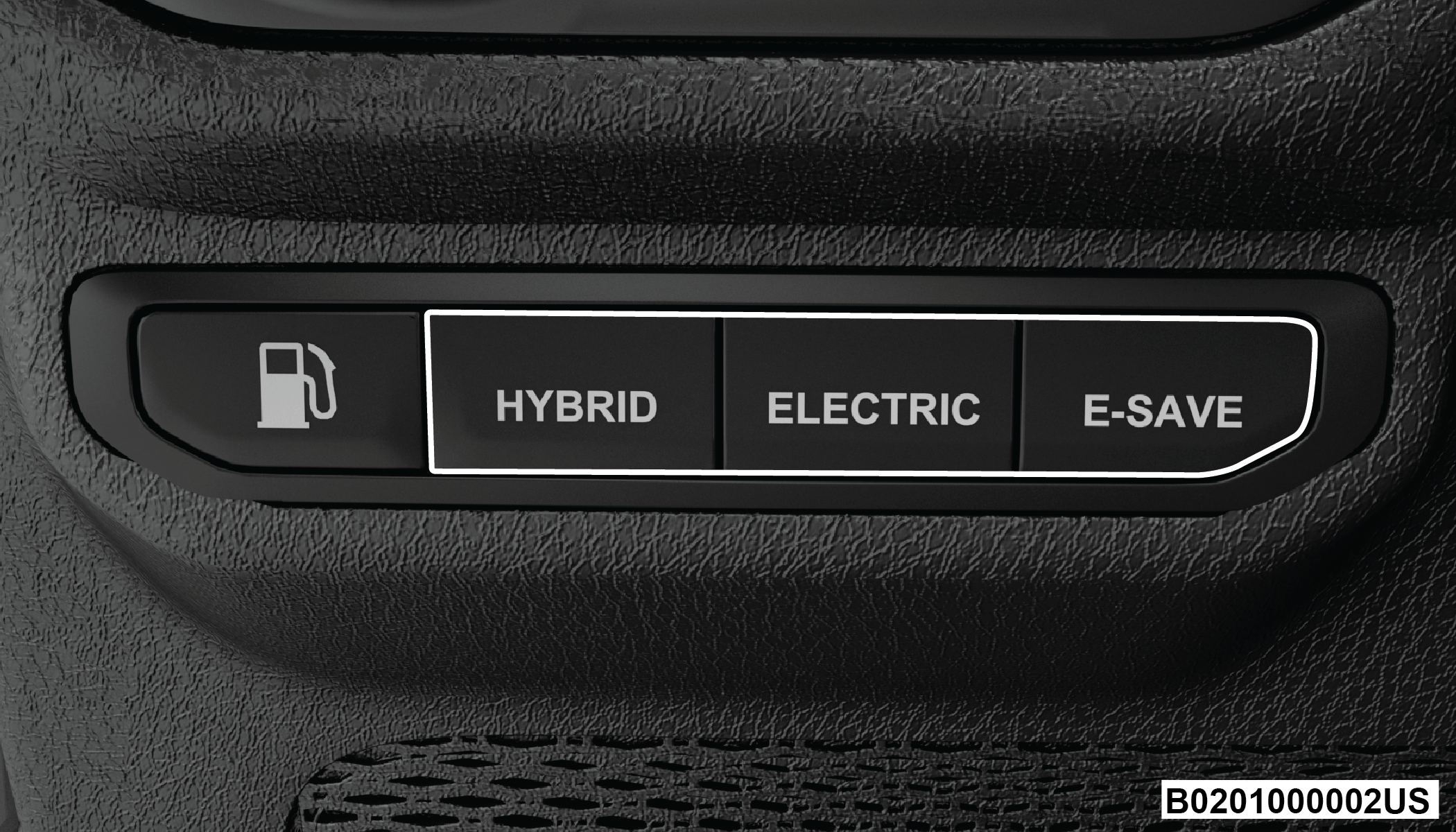
E-Select Mode
This system allows
the driver to select different modes by pushing the following buttons
located below the headlight switch.
E-Select Mode Switch
Hybrid: Depletes
electric range first, then gas range.
Automatically
switches between using gas and battery for greatest efficiency and
performance.
Best HVAC and
acceleration performance.
Default Mode.
Electric: Prevents
the engine from running, unless you absolutely need it.
Acceleration
and heating performance may be degraded.
Engine will
switch on during a Wide Open Throttle (WOT) event, or if cruise control
requires it.
Vehicle will
automatically switch to Hybrid mode upon reaching 0% State Of Charge
(SOC) or due to system needs.
Not allowed
with manual gate operation unless in 4WD Low and Selec-Speed Control
(SSC) is active.
e-Save: Engine
only. Saves the current SOC/Electric range for later.
SOC/Electric
range may increase, but will not decrease under most driving conditions.
Under heavy load, such as while pulling a trailer, SOC may decrease.